Skip to content
Get in touch

Create or change an image

Explore creating from a description, working from a reference, editing an existing image, and combining imagery with manual layout.

Go to My experiment

Explore

What are the ways to do this?

Description, reference, and one targeted revision

Show three adults repairing a brass lamp at a workbench, with a blue mug at left and a radio at right. Then change only the mug to terracotta red.

Notice: Which parts remain recognizable, and what else changes when one detail is revised?

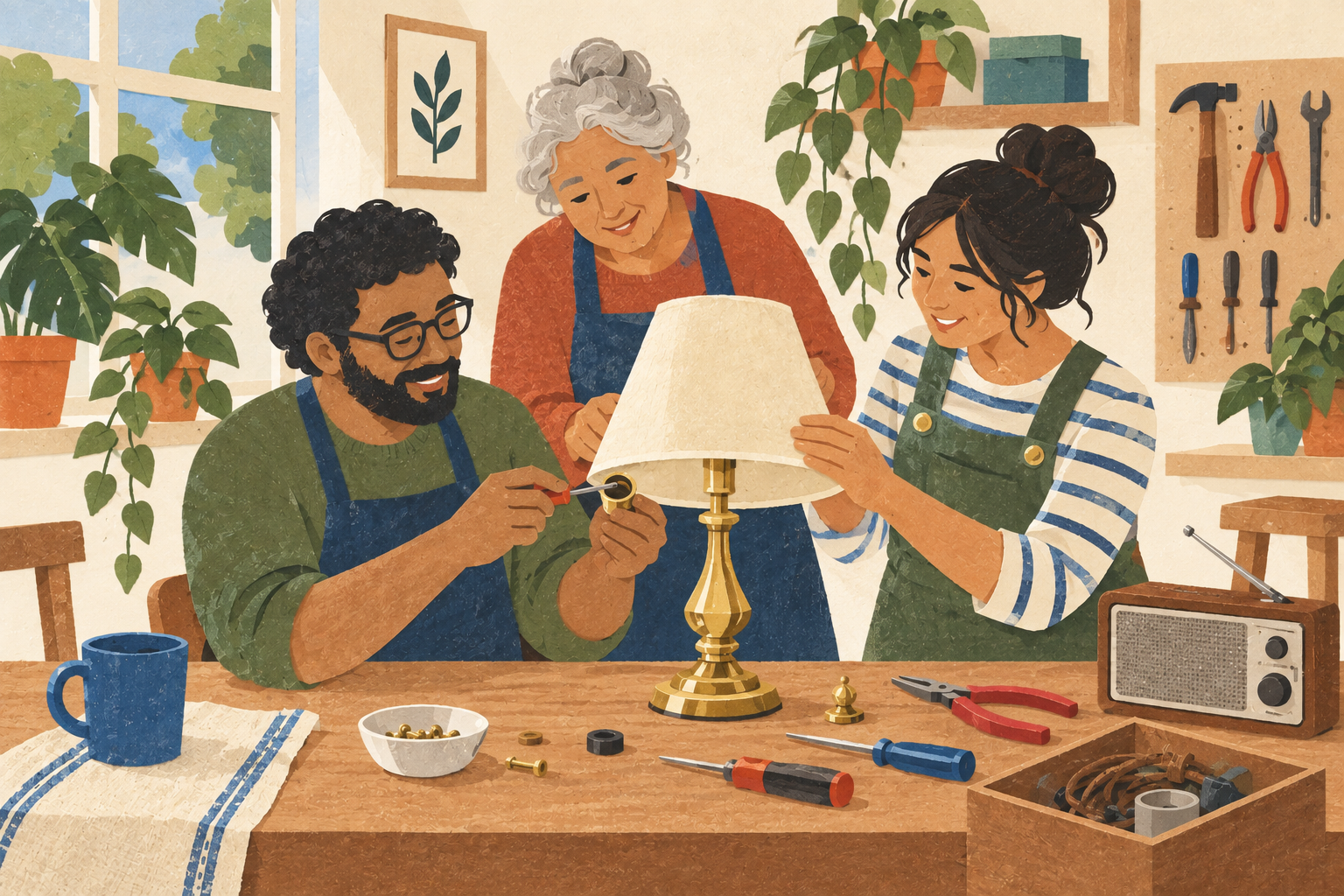
Three adults gather around a brass lamp at a repair-cafe workbench. A blue mug is at left and a radio at right; warm textured illustration.
From a descriptionThree adults gather around a brass lamp at a repair-cafe workbench. A blue mug is at left and a radio at right; warm textured illustration.

Credit: Created for Renaissance Solutions with OpenAI image generation in Codex. Credit details

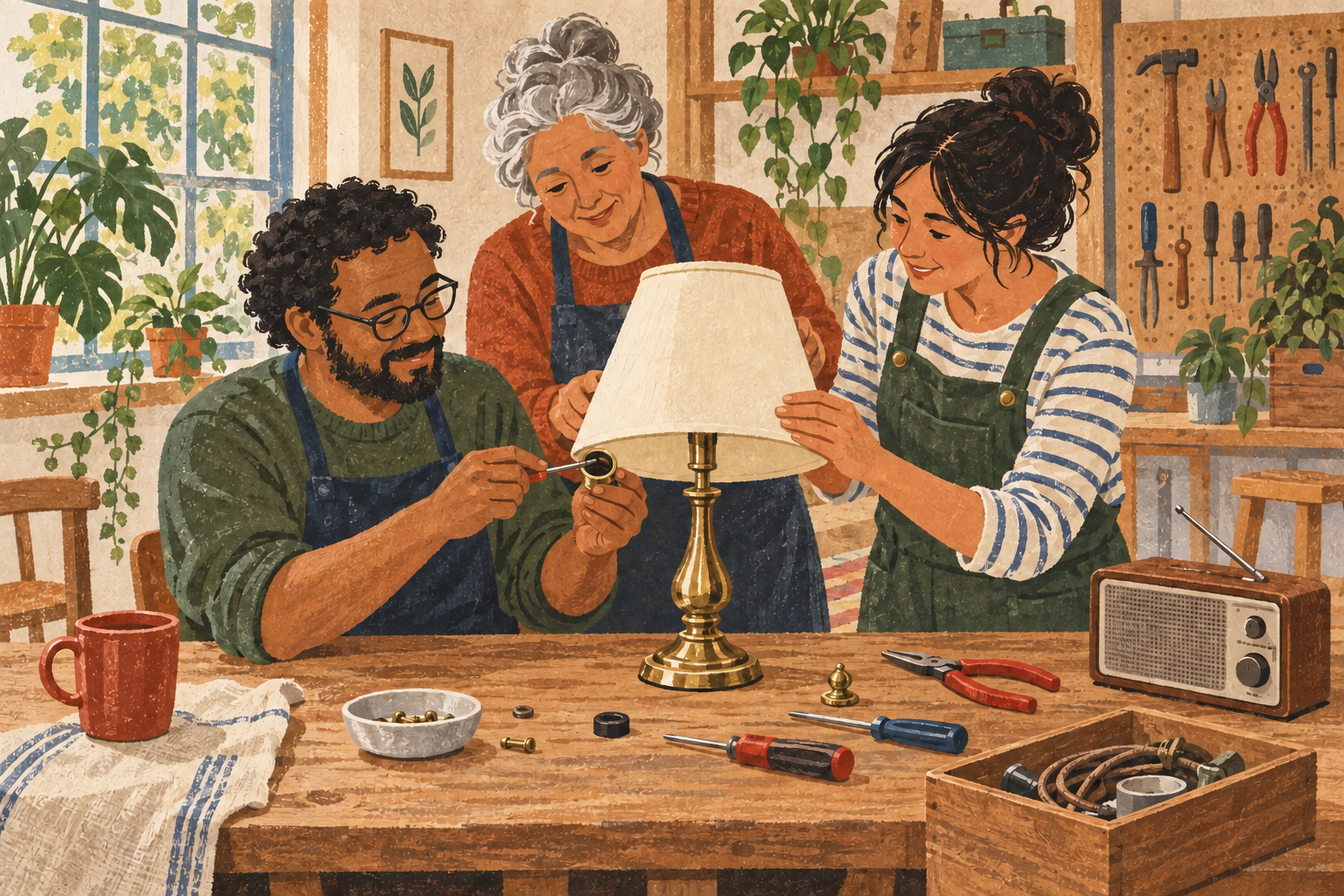
The same repair-cafe arrangement reinterpreted with flatter cut-paper shapes. Faces, clothing details, and object shapes change.
From a referenceThe same repair-cafe arrangement reinterpreted with flatter cut-paper shapes. Faces, clothing details, and object shapes change.

Credit: Created for Renaissance Solutions with OpenAI image generation in Codex. Style variation from the project’s original repair-café illustration. Credit details

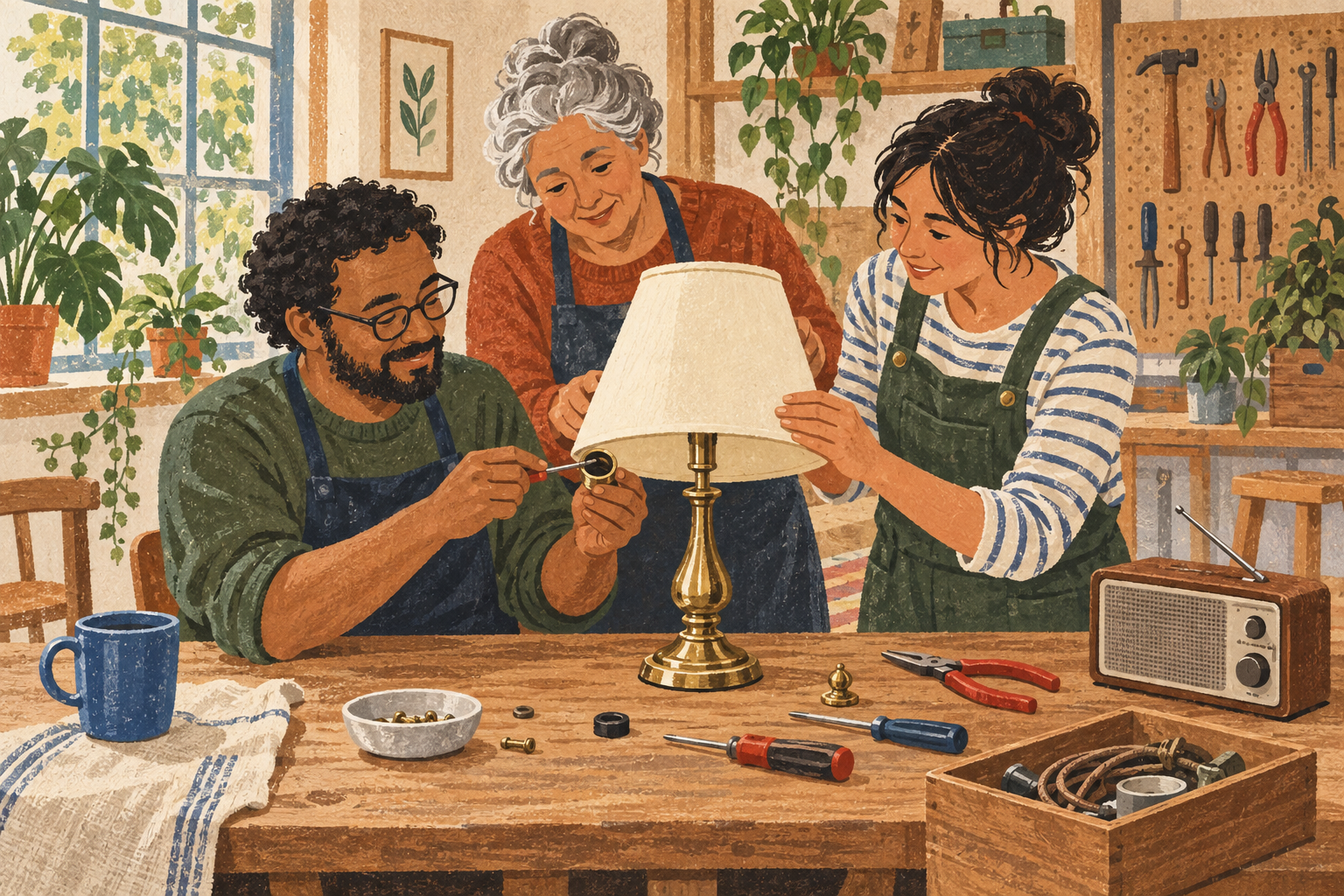
The blue mug becomes terracotta red while the group, brass lamp, and radio remain in a similar arrangement. Small differences elsewhere remain possible.
A targeted revisionThe blue mug becomes terracotta red while the group, brass lamp, and radio remain in a similar arrangement. Small differences elsewhere remain possible.

Credit: Created for Renaissance Solutions with OpenAI image generation in Codex. Targeted mug-color edit of the project’s original repair-café illustration. Credit details

What this shows: A text-created illustration, a reference-led style variation, and a targeted edit made from the first image.

What it cannot show: General product reliability, exact training sources, or how the same paths behave with private or rights-restricted material.

  • These are illustrative production observations, not a controlled vendor comparison.
  • One successful edit does not establish consistency across images or repeated attempts.
  • The source and revision were visually inspected; preservation is not claimed to be pixel-identical.

Approach map

Open any approach to inspect its starting material, human work, outputs, and sequence.

Generate from a descriptionDescribe the subject, setting, composition, visual treatment, and use, then inspect the result.
Starts with
A written brief · Required content and exclusions · Intended dimensions and use
Main actions
Write the prompt · Generate candidates · Check brief adherence · Revise or move to an editor
Outputs
Rendered images · Prompt and settings record
Human work
Choose what matters · Spot omissions and unwanted detail · Judge rights and suitability
Useful when
No source image is available · Early visual directions need exploration
  1. Fix the briefName required content, use, exclusions, and success before seeing results.
  2. Create candidatesKeep the prompt and settings with each output.
  3. Inspect the whole frameLook for missing objects, invented text, identity shifts, and unusable edges.
  4. Revise one thingTest whether a targeted change stays targeted.
Work from a referenceUse an image you may use to guide composition, subject, color, or style.
Starts with
An owned or permitted reference · A clear statement of what may change
Main actions
Record the reference source · Describe the relationship you want · Generate or edit · Compare to both the brief and source
Outputs
A derived or reference-guided image · A provenance record
Human work
Confirm permission · Prevent accidental copying or identity misuse · Check unwanted changes
Useful when
Composition or subject continuity matters · A sketch or approved image already exists
  1. Confirm the sourceKnow who made it and what the intended use permits.
  2. Choose how the reference helpsUse only the influence the project needs.
    • Composition or subjectName what must remain: List objects, positions, identities, and empty space.
    • Visual treatmentDescribe the qualities: Name color, texture, contrast, and mark-making without relying on an artist name.
  3. Compare carefullyCheck what carried over and what changed.
Edit an existing imageChange, remove, extend, or replace a selected part of an image.
Starts with
An image you may edit · A precise change request · A preserved original
Main actions
Select or describe the target · Apply the edit · Overlay before and after · Repair spillover manually if needed
Outputs
A revised image · The untouched original and edit record
Human work
Define the edit boundary · Inspect outside the target · Choose whether to accept, retry, or edit manually
Useful when
Most of the image already works · A small correction is cheaper than rebuilding
  1. Preserve the originalNever make the only copy the edit target.
  2. Make the request specificState what changes and what must stay.
  3. Check beyond the targetCompare faces, hands, objects, text, crop, and color elsewhere.
Build a manual compositionCombine owned, licensed, generated, drawn, or photographed elements in an editor.
Starts with
A layout goal · Source assets with recorded rights · An editor that preserves working files
Main actions
Place and mask elements · Add exact text manually · Adjust hierarchy and color · Export while keeping an editable master
Outputs
An editable composition · A flattened delivery image
Human work
Make layout decisions · Match edges, light, scale, and perspective · Maintain source credits
Useful when
Exact text or brand control matters · Different asset sources need assembly · Future revisions are likely
  1. Collect permitted assetsKeep source links and licenses.
  2. Compose in layersKeep text, subjects, and background editable.
  3. Export for the real useCheck size, crop, color, and accessibility description.
Start with your intention

Use My experiment to note your audience, material, limits, equipment, and sharing restrictions. Every field is optional. “Try with our example” fills only an empty goal and constraints field.

Prompt · version 1

Investigate ways to create or change an image

When you have an image goal but do not yet know whether to generate, edit, combine, or make it manually.

Map image-making and editing workflows around your actual material and use.

Example: A repair café needs a welcoming illustration with three adults, a brass lamp, a blue mug, a radio, and room for a headline.

Show the full prompt

The published prompt stays unchanged.

Source checked ·

Tools to investigate

A practical starting shortlist, chosen for different workflows rather than ranked quality. Features were checked against official sources on this date; we did not run a comparative test of these services. Plans and interfaces can change.

This shortlist reflects the date above. Confirm current features, terms, pricing, privacy, exports, and accessibility before choosing.

A high-level workflow

  1. Write a brief with subject, composition, audience and intended size.
  2. Choose generation, a permitted reference, or a design assembled from existing assets.
  3. Try a small set of drafts, then change one thing at a time.
  4. Check details, add important text as editable type, and export with source and credit records.

ChatGPT Images

Purpose and fit
Exploring an illustration through a written brief and follow-up revisions.
How to explore it
Describe the subject, composition and intended use; generate a draft; request one change at a time or supply an image you may use as a reference.
Watch for
Edits can change areas you wanted to preserve. Check the whole image, including hands, lettering and small details, before exporting.

Sources checked

Adobe Firefly

Purpose and fit
Generating images and revising a selected part of an existing image.
How to explore it
Describe a draft, compare a few alternatives, then use a selected-area edit to change or remove a detail. Save the original and the revision.
Watch for
Confirm which model and terms apply to the generation. Inspect edges and surrounding content after an edit.

Sources checked

Canva Magic Media

Purpose and fit
Making an image and placing it in a poster, invitation or presentation.
How to explore it
Generate a visual from a brief, place it in a design, and add important text as editable type before exporting.
Watch for
Generated imagery, uploaded material and Canva library assets can have different terms. Check each asset and your export format.

Sources checked

Decide

What matters for your project?

Use a few criteria and a separate must-have list. An unknown must-have remains unresolved.

Must-have

Brief adherence

Required people, objects, relationships, and space appear.

Acceptable: Three adults, brass lamp, mug, radio, and headline space remain recognizable.

Must-have

Control over revision

A requested change stays as local as possible.

Acceptable: The mug changes color without losing required subjects or layout.

Must-have

Source rights and privacy

Every reference and uploaded image is permitted for this use.

Acceptable: Sources, permissions, service terms, and sensitive material are recorded.

Must-have

Usable resolution

The file supports the intended crop and display.

Acceptable: Final pixel dimensions and crop remain clear at the intended placement.

Preference

Editability

Important text and layout can be corrected later.

Acceptable: An editable master or a practical manual repair path remains available.

Preference

Revision effort

Attempts and manual repair are visible.

Acceptable: The maker records prompts, retries, fixes, time, and cost.

AI reported

What an AI response says. Follow the sources before relying on it.

Source checked

What an opened source states. This does not prove product performance.

We tested

What RS observed in a dated, bounded trial.

Still uncertain

What is unknown, unverified, or outside the trial.

Prompt · version 1.0

Shape image criteria one question at a time

Before comparing image paths or when “looks good” is not enough.

Turn an image idea into concrete, revisable criteria.

Example: The illustration must keep the people, brass lamp, mug, radio, and headline space recognizable.

Show the full prompt

The published prompt stays unchanged.

Prompt · version 1.0

Compare two image paths without hiding revisions

After making two images from the same brief or revising one image twice.

Keep source claims, dated testing, and your observations separate.

Example: Compare two repair-café illustrations and one targeted change to a required object.

Show the full prompt

The published prompt stays unchanged.

Experiment

Make the same illustration in two paths, then revise one detail

Keep the repair-café brief and intended use fixed while testing control, change, and revision effort.

Ready-to-use brief

Create a warm, documentary-style illustration of three adults repairing a brass table lamp at a shared workbench. Include a blue mug on the left and a small radio on the right. Leave a quiet area for a short headline. Do not include a real venue name, logo, or event date.

Input

Use the brief alone for one path. For the other, use an owned or permitted reference, existing image, or manual layout. Then request one change: make the blue mug terracotta red while preserving the people, lamp, radio, composition, and headline space.

Limit

Aim for 45–60 minutes and no purchase. Record the final dimensions, attempts, elapsed time, and any credits used.

Path 1

Generate from the written description, then request the targeted edit.

Path 2

Start from a permitted reference or existing image and make the same targeted edit or manual change.

Only one candidate? Create one image, make the mug-color revision, and compare the rest of the image before and after.

Define success before you begin

  1. Define success and preserve the exact brief.
  2. Record every source image and its permission.
  3. Create one output in each feasible path.
  4. Make the same targeted revision.
  5. Compare brief adherence, unwanted changes, resolution, editability, effort, time, and cost.
  6. Choose a next step without generalizing from one successful sample.

Observation questions

  • Are all required people and objects recognizable?
  • What changed outside the requested mug edit?
  • Is the image large enough and framed for its intended use?
  • Can important elements be edited without rebuilding the image?
  • What rights, uploads, and source materials need recording?

What would you do next? Continue, change an approach, check a claim, try a simpler method, or stop.

Recorded on 2026-09-17

We ran the landscape prompt

Compares text generation, reference guidance, targeted editing, and manual layout, then proposes a paired edit-spillover experiment.

Read the prompt, response, sources, evidence labels, limits, and next question.