We check the box: “we have backups.” The quiet question is smaller. Protected from what?
Sometimes the sync still runs. The backup job is green. And you still can’t get this piece of the business back the way you need. That mismatch is ordinary — not a thriller. It is what this piece is about.
Plain words for “backup”
People use one word for several different things:
- Sync — another current copy. Bad changes can sync too.
- Replication — keeps things available. It is not always history.
- Versioning — earlier states. Not always a separate place that can fail on its own.
- Backup — a recoverable copy meant for specified failures.
- Archive — long-term keep.
A useful rule: count independent failure domains, not copies.
A failure domain is a place that can fail on its own — a laptop, a cloud account, a password, an automation identity. Local .git history dies with the laptop. A remote adds a boundary. That still is not full disaster recovery if the same identity can hit both places.
What was true before
Legacy failures still matter. Devices get lost. People delete the wrong folder. Scripts go sideways. Data corrupts quietly. Credentials leak. Ransomware is one item on that list — not the only story. Restores go untested. Backups faithfully save data that was already wrong. Retention is too short for late discovery.
SaaS added a twist long before GenAI. “We back everything up” often means their disaster recovery, not your recoverability after an admin mistake, a bad integration, or a compromised credential. That gap shows up in the systems that run the business — CMS, CRM, trackers, hosted databases, automation — not only in file storage.
Service resilience vs customer recoverability
Service resilience: Can the vendor bring the service back when their servers fail?
Customer recoverability: Can you recover the business after a logical or business failure — a delete, a bad sync, compromised credentials, a bad automation action, an account termination?
A vendor can score high on the first and weak on the second. That gap is the illusion.
A grounded example — Supabase (positive nuance)
Managed database backups are real controls. On Supabase, Pro and higher plans get automatic daily database backups. PITR (point-in-time recovery — restore to a chosen moment) is available as an add-on. Supabase documents a worst-case recovery point objective (RPO) of two minutes (as of 2026-09-15).1
What those controls cover is the database. Objects in Storage are not in the database backups. Restoring an old backup does not bring back Storage objects you deleted after that backup.
If you delete the project, associated data — including backups — goes with it.
Clone and restore paths are database-focused. Storage objects, Edge Functions, and Auth dashboard settings and API keys need separate handling if you want the whole app back.12
One line: “They back up our database” is not the same as “we can reconstruct our app.” That is transparency about scope, not a slam dunk.
What GenAI changes (and what it does not)
GenAI did not invent privileged mistakes, destructive automation, or sync that spreads deletion.
What changes is speed, scale, and how long it takes to notice. One agent action can touch several SaaS tools before anyone sees the mess. The risk is not “AI destroys backups.” The risk is privileged automation with a large blast radius — imperfect actions, not a mind with intent.
Semantically valid corruption starts as a human example: someone (or an agent) runs a bulk update that looks fine in the database. Rows are valid. The backup job stays green. The wrong business state gets faithfully saved — and may sit there past the useful retention window. PITR then lets you pick which wrong state, not a magic “correct” one.
Correlated authority is the twin: different servers can still be one failure domain if the same identity, agent, or admin can change both.
One principle of judgment: agents (and people) may create recovery points without authority to destroy them.
Three recovery capabilities
Especially for small orgs assembled from many SaaS products, ask three questions:
- History — Can we go back far enough?
- Isolation — Can the same failure destroy production and recovery?
- Portability — Can we rebuild important business information outside the failed system?
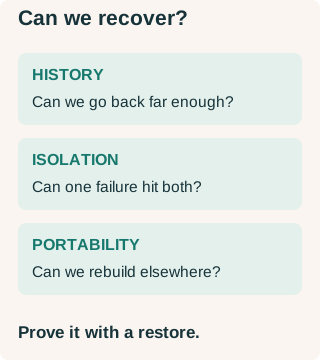
Ask whether recovery reaches far enough back, survives the relevant failure, and can rebuild important information outside the failed system. A tested restore supplies evidence that a green backup job alone cannot provide. Conceptual diagram created with Codex for Renaissance Solutions. CC0-1.0.
Recovery Independence Test
One question: Could the same event damage both the system and the thing we depend on to recover it?
Walk the boundaries: device · location · provider · account · credential · authorization · agent/automation · software/integration · human admin · time/retention.
Three practical moves
1. Ask vendors better
Two spoken questions:
- “Walk me through recovering if an admin, integration, or agent corrupted our account two weeks ago.”
- “Assume your service is unavailable — what can we recover ourselves?”
Then a short checklist: coverage · retention · granularity · independence · portability · restore time · whether tenant deletion takes backups with it · whether you can test a restore.
2. Right-size the controls
Match controls to consequence. Local versioning plus an independent remote plus a tested restore is a common pattern. SaaS may need native recovery, a periodic independent export, and config-as-code (settings stored as files you can rebuild from) where it helps.
In plain words: RPO is how much recent work we can afford to lose, measured in time. RTO is how fast we must be back.
3. Restore something
Periodically prove recovery. A green backup job is not a test.
Close
Backup jobs are easy to turn on. That does not mean you are more recoverable. The goal is not more mechanisms. Know which failures matter. Keep the same failure from casually killing the recovery path. Prove you can get back.
Additional source note
Apple Time Machine still documented (local snapshots share the Mac’s failure domain when the backup disk isn’t there):
- Restore whole Mac https://support.apple.com/en-us/102551 (published 2025-11-10)
- Restore files https://support.apple.com/guide/mac-help/restore-files-mh11422/mac
- Local snapshots https://support.apple.com/en-us/102154 (published 2026-07-06).
Footnotes
-
- Supabase platform backups (fetched 2026-09-15): https://supabase.com/docs/guides/platform/backups — daily/PITR scope, Storage gap, project-delete behavior.
- Supabase database backups feature page (checked 2026-09-15): https://supabase.com/features/database-backups — two-minute worst-case RPO for PITR.
-
- Supabase clone project (fetched 2026-09-15): https://supabase.com/docs/guides/platform/clone-project — database-only; Storage, Edge Functions, Auth settings/API keys not copied.
- Self-host restore companion: https://supabase.com/docs/guides/self-hosting/restore-from-platform